

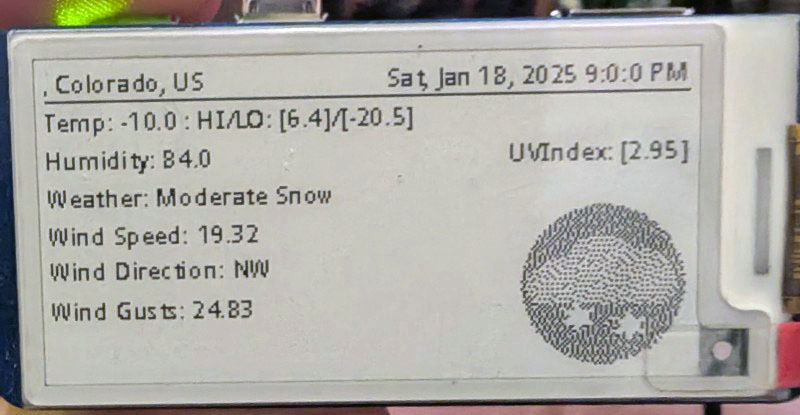
Learning how to use an E-Ink display, and GeoPy, Open-Meteo python libraries.
I’ve recently been using a Waveshare 2.3″ E-Ink display hat for various Raspberry Pi hardware. There are a number of projects out there that use this cute little display, and I would like the throw some of my code into the arena. To help learn python and the E-ink display, I’ve created a little weather app.
All the code is posted to my Github Repository. This code is a work in progress, and basically just a test piece, there really no error control.
I’m assuming that you have your Waveshare 2.13in E-Ink display correcly setup with your hardware. I’m using Waveshare 2.13in E-Ink display HAT V4 connected to a Raspberry Pi Zero 2W. If you haven’t set it up yet, visit https://www.waveshare.com/wiki/2.13inch_e-Paper_HAT_Manual and follow the directions for your hardware.
This next step is for use with Raspberry Pi hardware.
Install the necessary python libraries:
sudo apt update
sudo apt install python3-pip
sudo apt install python3-pil
sudo apt install python3-numpy
sudo apt install python3-gpiozero
sudo pip3 install spidev
For WeatherInk.py, GeoPy and Open-Meteo libraries are needed:
pip install openmeteo-requests
pip install requests-cache retry-requests numpy pandas
pip install geopy
WeatherInk.py takes Latitude and Longitude coordinates and returns weather information, and displays it on an E-Ink display. I wrote this as an exercise to use an E-Ink display, and get weather info. The GPS function was a bonus. There are still issues with the code, throws an error when trying to convert GPS coordinates to a place without name, etc. Use at your own risk. Weather icons and font.ttc must be downloaded from my github
weatherink.py:
# /*****************************************************************************
# * | File        :	  weatherink.py
# * | Author      :   Michael Bapst (lynxsilver@gmail.com)
# * | Function    :   Retrieves Weather from Open-Meteo and Displays it on a
# * |             :   Waveshare 2.13in E-Ink Display
# * | Info        :   I wrote this as an exercise to use an E-Ink display, and
# * |             :   get weather info. The GPS function was a bonus.
# * |             :   There are still issues with the code, throws an error when
# * |             :   trying to convert GPS coordinates to a place without name,
# * |             :   etc.
# *----------------
# * | This version:   V1.0
# * | Date        :   1/18/2025
# * | Info        :
# ******************************************************************************
# Permission is hereby granted, free of charge, to any person obtaining a copy
# of this software and associated documnetation files (the "Software"), to deal
# in the Software without restriction, including without limitation the rights
# to use, copy, modify, merge, publish, distribute, sublicense, and/or sell
# copies of the Software, and to permit persons to  whom the Software is
# furished to do so, subject to the following conditions:
#
# The above copyright notice and this permission notice shall be included in
# all copies or substantial portions of the Software.
#
# THE SOFTWARE IS PROVIDED "AS IS", WITHOUT WARRANTY OF ANY KIND, EXPRESS OR
# IMPLIED, INCLUDING BUT NOT LIMITED TO THE WARRANTIES OF MERCHANTABILITY,
# FITNESS OR A PARTICULAR PURPOSE AND NONINFRINGEMENT. IN NO EVENT SHALL THE
# AUTHORS OR COPYRIGHT HOLDERS BE LIABLE FOR ANY CLAIM, DAMAGES OR OTHER
# LIABILITY WHETHER IN AN ACTION OF CONTRACT, TORT OR OTHERWISE, ARISING FROM,
# OUT OF OR IN CONNECTION WITH THE SOFTWARE OR THE USE OR OTHER DEALINGS IN
# THE SOFTWARE.
#*****************************************************************************
# The following libraries need to be installed:
# Install Open Meteo:
# pip install openmeteo-requests
# pip install requests-cache retry-requests numpy pandas
#
# Install geopy
# pip install geopy

import sys
import os
import logging
import epd2in13_V4
import time
from PIL import Image,ImageDraw,ImageFont
import traceback
import openmeteo_requests
from convertweather import convertUnixTime, RoundTemp, RoundWindSpeed, HeadingToCompass, DecodeWeatherCode, SecToHours, GetCity
import requests_cache
import pandas as pd
from retry_requests import retry

# Setup the Open-Meteo API client with cache and retry on error
cache_session = requests_cache.CachedSession('.cache', expire_after = 3600)
retry_session = retry(cache_session, retries = 5, backoff_factor = 0.2)
openmeteo = openmeteo_requests.Client(session = retry_session)

# For more information about Open-Meteo goto https://open-meteo.com/en/docs
# Make sure all required weather variables are listed here
# The order of variables in hourly or daily is important to assign them correctly below
# Change the Lat & Lon to the area you want weather info from. use https://open-meteo.com/en/docs to get your Lat & Lon
url = "https://api.open-meteo.com/v1/forecast"
params = {
	"latitude": 64.1355,
	"longitude": -21.8954,
	"current": ["temperature_2m", "relative_humidity_2m", "weather_code", "wind_speed_10m", "wind_direction_10m", "wind_gusts_10m"],
	"daily": ["weather_code", "temperature_2m_max", "temperature_2m_min", "sunrise", "sunset", "daylight_duration", "sunshine_duration", "uv_index_max"],
	"temperature_unit": "fahrenheit",
	"wind_speed_unit": "mph",
	"precipitation_unit": "inch",
	"timezone": "America/New_York",
	"forecast_days": 1
}
responses = openmeteo.weather_api(url, params=params)

# Process first location. Add a for-loop for multiple locations or weather models
response = responses[0]
wAddress = GetCity(response.Latitude(), response.Longitude())

# Current values. The order of variables needs to be the same as requested.
current = response.Current()
wTemp = round(current.Variables(0).Value(), 1)
wHumid =  current.Variables(1).Value()
wWeatherCode, wIcon = DecodeWeatherCode(current.Variables(2).Value())
wWindSpd = round(current.Variables(3).Value(), 2)
wWindDir = HeadingToCompass(current.Variables(4).Value())
wWindGust = round(current.Variables(5).Value(), 2)
wDateTime = convertUnixTime(current.Time())

# Process daily data. The order of variables needs to be the same as requested.
daily = response.Daily()
wTempHi = RoundTemp(daily.Variables(1).ValuesAsNumpy())
wTempLo = RoundTemp(daily.Variables(2).ValuesAsNumpy())
wUVIndex = daily.Variables(7).ValuesAsNumpy()

#Setup WaveShare 2.13 V4
epd = epd2in13_V4.EPD()
epd.init()
#epd.Clear(0xFF)

# Drawing on the image
fontObj = ImageFont.truetype('font.ttc', 10)
wImage = Image.new('1', (epd.height, epd.width), 255)  # 255: clear the frame
draw = ImageDraw.Draw(wImage)
draw.text((0, 0), wAddress, font = fontObj, fill = 0)
draw.line([(0,13),(250,13)], fill = 0,width = 1)
draw.text((250, 0), wDateTime, font = fontObj, fill = 0, anchor = "ra")
draw.text((0, 15), "Temp: " + str(wTemp) + " : HI/LO: " + str(wTempHi) + "/" + str(wTempLo), font = fontObj, fill = 0)
draw.text((0, 30), "Humidity: " + str(wHumid), font = fontObj, fill = 0)
draw.text((250, 30), "UVIndex: " + str(wUVIndex), font = fontObj, fill = 0, anchor = "ra")
draw.text((1, 45), "Weather: " + wWeatherCode, font = fontObj, fill = 0)    #Setting the position to 2 keeps the W in weather from getting cut off
draw.text((1, 60), "Wind Speed: " + str(wWindSpd), font = fontObj, fill = 0)
draw.text((1, 75), "Wind Direction: " + str(wWindDir), font = fontObj, fill = 0)
draw.text((1, 90), "Wind Gusts: " + str(wWindGust), font = fontObj, fill = 0)
bmpIcon = Image.open(os.path.join(os.path.dirname(__file__), wIcon))
wImage.paste(bmpIcon,(185,57))
wImage = wImage.rotate(180) # rotate
epd.display(epd.getbuffer(wImage))

# Exit
epd.init()
epd.sleep()
epd2in13_V4.epdconfig.module_exit(cleanup=True)
exit()
convertweather.py
# /*****************************************************************************
# * | File        :	  convertweather.py
# * | Author      :   Michael Bapst (lynxsilver@gmail.com)
# * | Function    :   Various conversion functions used by Weather Ink python app
# * | Info        :
# *----------------
# * | This version:   V1.0
# * | Date        :   1/18/2025
# * | Info        :
# ******************************************************************************
# Permission is hereby granted, free of charge, to any person obtaining a copy
# of this software and associated documnetation files (the "Software"), to deal
# in the Software without restriction, including without limitation the rights
# to use, copy, modify, merge, publish, distribute, sublicense, and/or sell
# copies of the Software, and to permit persons to  whom the Software is
# furished to do so, subject to the following conditions:
#
# The above copyright notice and this permission notice shall be included in
# all copies or substantial portions of the Software.
#
# THE SOFTWARE IS PROVIDED "AS IS", WITHOUT WARRANTY OF ANY KIND, EXPRESS OR
# IMPLIED, INCLUDING BUT NOT LIMITED TO THE WARRANTIES OF MERCHANTABILITY,
# FITNESS OR A PARTICULAR PURPOSE AND NONINFRINGEMENT. IN NO EVENT SHALL THE
# AUTHORS OR COPYRIGHT HOLDERS BE LIABLE FOR ANY CLAIM, DAMAGES OR OTHER
# LIABILITY WHETHER IN AN ACTION OF CONTRACT, TORT OR OTHERWISE, ARISING FROM,
# OUT OF OR IN CONNECTION WITH THE SOFTWARE OR THE USE OR OTHER DEALINGS IN
# THE SOFTWARE.
#*****************************************************************************
#
# Install geopy : pip install geopy
#
from geopy.geocoders import Nominatim
from geopy.exc import GeocoderServiceError
from datetime import datetime
import numpy as np

def GetCity(Lat, Lon):
	geolocator = Nominatim(user_agent="E-Ink_Weather_App")
	try:
		location = geolocator.reverse(str(Lat) + "," + str(Lon))
		address = location.raw['address']

		# Traverse the data
		city = address.get('city', '')
		state = address.get('state', '')
		code = address.get('country_code')
		addrss = city + ", " + state + ", " + code.upper()
		return addrss
	except GeocoderServiceError as e:
		print("Error: ", e)
		return "ERROR"

def convertUnixTime(UnixTime):
	# Convert UNIX time to Modern
	return datetime.utcfromtimestamp(UnixTime).strftime('%a, %b %-d, %Y %-I:%-M:%-S %p')

def RoundTemp(Temperature):
	# Cleanup temperature
	return np.round(Temperature, 1)

def RoundWindSpeed(WindSpeed):
        # Cleanup Wind Speed
        return np.round(WindSpeed, 2)

def HeadingToCompass(Heading):
        # Convert Heading to Compass points (N-NE-E-SE-S-SW-W-NW)
	# Converts a heading in degrees to a compass direction.

	directions = ["N", "NNE", "NE", "ENE", "E", "ESE", "SE", "SSE",
	          "S", "SSW", "SW", "WSW", "W", "WNW", "NW", "NNW"]
	index = round(Heading / 22.5) % 16
	return directions[index]

def DecodeWeatherCode(WeatherCode):
    match WeatherCode:
        case 0:
            return "Clear Sky", "icon/wmo_icon_00d.bmp"
        case 1:
            return "Mainly Clear", "icon/wmo_icon_01d.bmp"
        case 2:
            return "Partly Cloudy", "icon/wmo_icon_02d.bmp"
        case 3:
            return "Overcast", "icon/wmo_icon_03d.bmp"
        case 45:
            return "Fog", "icon/wmo_icon_45d.bmp"
        case 48:
            return "Freezing Fog", "icon/wmo_icon_45d.bmp"
        case 51:
            return "Light Drizzle", "icon/wmo_icon_53d.bmp"
        case 53:
            return "Moderate Drizzle", "icon/wmo_icon_53d.bmp"
        case 55:
            return "Heavy Drizzle", "icon/wmo_icon_53d.bmp"
        case 56:
            return "Light Freezing Drizzle", "icon/wmo_icon_57d.bmp"
        case 57:
            return "Heavy Freezing Drizzle", "icon/wmo_icon_57d.bmp"
        case 61:
            return "Light Rain", "icon/wmo_icon_61d.bmp"
        case 63:
            return "Moderate Rain", "icon/wmo_icon_61d.bmp"
        case 65:
            return "Heavy Rain", "icon/wmo_icon_65d.bmp"
        case 66:
            return "Light Freezing Rain", "icon/wmo_icon_66d.bmp"
        case 67:
            return "Heavy Freezing Rain", "icon/wmo_icon_67d.bmp"
        case 71:
            return "Light Snow", "icon/wmo_icon_71d.bmp"
        case 73:
            return "Moderate Snow", "icon/wmo_icon_73d.bmp"
        case 75:
            return "Heavy Snow", "icon/wmo_icon_75d.bmp"
        case 77:
            return "Snow Pellets", "icon/wmo_icon_75d.bmp"
        case 80:
            return "Light Rain Showers", "icon/wmo_icon_80d.bmp"
        case 81:
            return "Moderate Rain Showers", "icon/wmo_icon_81d.bmp"
        case 82:
            return "Heavy Rain Showers", "icon/wmo_icon_81d.bmp"
        case 85:
            return "Light Snow Showers", "icon/wmo_icon_85d.bmp"
        case 86:
            return "Heavy Snow Showers", "icon/wmo_icon_86d.bmp"
        case 95:
            return "Thunderstorms", "icon/wmo_icon_95d.bmp"
        case 96:
            return "Thunderstorms with Light Hail", "icon/wmo_icon_96d.bmp"
        case 99:
            return "Thunderstorms with Heavy Hail", "icon/wmo_icon_96d.bmp"
        case _:
            return "Invalid Weather Code", "icon/wmo_icon_err.bmp"

def SecToHours(seconds):
	numHr = np.round(int(seconds/3600), 0)
	numMin = np.round(int((seconds%3600)/60), 0)
	numSec = np.round(int((seconds%3600)%60), 0)
	#strHr = ["{:0f} hrs {:0f} mins {:0f} secs".format(float(numHr), float(numMin), float(numSec))]
	strHr = ["{} hrs {} mins {} secs".format(numHr, numMin, numSec)]
	return strHr
epdconfig.py
# /*****************************************************************************
# * | File        :	  epdconfig.py
# * | Author      :   Waveshare team
# * | Function    :   Hardware underlying interface
# * | Info        :
# *----------------
# * | This version:   V1.2
# * | Date        :   2022-10-29
# * | Info        :
# ******************************************************************************
# Permission is hereby granted, free of charge, to any person obtaining a copy
# of this software and associated documnetation files (the "Software"), to deal
# in the Software without restriction, including without limitation the rights
# to use, copy, modify, merge, publish, distribute, sublicense, and/or sell
# copies of the Software, and to permit persons to  whom the Software is
# furished to do so, subject to the following conditions:
#
# The above copyright notice and this permission notice shall be included in
# all copies or substantial portions of the Software.
#
# THE SOFTWARE IS PROVIDED "AS IS", WITHOUT WARRANTY OF ANY KIND, EXPRESS OR
# IMPLIED, INCLUDING BUT NOT LIMITED TO THE WARRANTIES OF MERCHANTABILITY,
# FITNESS OR A PARTICULAR PURPOSE AND NONINFRINGEMENT. IN NO EVENT SHALL THE
# AUTHORS OR COPYRIGHT HOLDERS BE LIABLE FOR ANY CLAIM, DAMAGES OR OTHER
# LIABILITY WHETHER IN AN ACTION OF CONTRACT, TORT OR OTHERWISE, ARISING FROM,
# OUT OF OR IN CONNECTION WITH THE SOFTWARE OR THE USE OR OTHER DEALINGS IN
# THE SOFTWARE.
#

import os
import logging
import sys
import time
import subprocess

from ctypes import *

logger = logging.getLogger(__name__)


class RaspberryPi:
    # Pin definition
    RST_PIN  = 17
    DC_PIN   = 25
    CS_PIN   = 8
    BUSY_PIN = 24
    PWR_PIN  = 18
    MOSI_PIN = 10
    SCLK_PIN = 11

    def __init__(self):
        import spidev
        import gpiozero

        self.SPI = spidev.SpiDev()
        self.GPIO_RST_PIN    = gpiozero.LED(self.RST_PIN)
        self.GPIO_DC_PIN     = gpiozero.LED(self.DC_PIN)
        # self.GPIO_CS_PIN     = gpiozero.LED(self.CS_PIN)
        self.GPIO_PWR_PIN    = gpiozero.LED(self.PWR_PIN)
        self.GPIO_BUSY_PIN   = gpiozero.Button(self.BUSY_PIN, pull_up = False)


    def digital_write(self, pin, value):
        if pin == self.RST_PIN:
            if value:
                self.GPIO_RST_PIN.on()
            else:
                self.GPIO_RST_PIN.off()
        elif pin == self.DC_PIN:
            if value:
                self.GPIO_DC_PIN.on()
            else:
                self.GPIO_DC_PIN.off()
        # elif pin == self.CS_PIN:
        #     if value:
        #         self.GPIO_CS_PIN.on()
        #     else:
        #         self.GPIO_CS_PIN.off()
        elif pin == self.PWR_PIN:
            if value:
                self.GPIO_PWR_PIN.on()
            else:
                self.GPIO_PWR_PIN.off()

    def digital_read(self, pin):
        if pin == self.BUSY_PIN:
            return self.GPIO_BUSY_PIN.value
        elif pin == self.RST_PIN:
            return self.RST_PIN.value
        elif pin == self.DC_PIN:
            return self.DC_PIN.value
        # elif pin == self.CS_PIN:
        #     return self.CS_PIN.value
        elif pin == self.PWR_PIN:
            return self.PWR_PIN.value

    def delay_ms(self, delaytime):
        time.sleep(delaytime / 1000.0)

    def spi_writebyte(self, data):
        self.SPI.writebytes(data)

    def spi_writebyte2(self, data):
        self.SPI.writebytes2(data)

    def DEV_SPI_write(self, data):
        self.DEV_SPI.DEV_SPI_SendData(data)

    def DEV_SPI_nwrite(self, data):
        self.DEV_SPI.DEV_SPI_SendnData(data)

    def DEV_SPI_read(self):
        return self.DEV_SPI.DEV_SPI_ReadData()

    def module_init(self, cleanup=False):
        self.GPIO_PWR_PIN.on()

        if cleanup:
            find_dirs = [
                os.path.dirname(os.path.realpath(__file__)),
                '/usr/local/lib',
                '/usr/lib',
            ]
            self.DEV_SPI = None
            for find_dir in find_dirs:
                val = int(os.popen('getconf LONG_BIT').read())
                logging.debug("System is %d bit"%val)
                if val == 64:
                    so_filename = os.path.join(find_dir, 'DEV_Config_64.so')
                else:
                    so_filename = os.path.join(find_dir, 'DEV_Config_32.so')
                if os.path.exists(so_filename):
                    self.DEV_SPI = CDLL(so_filename)
                    break
            if self.DEV_SPI is None:
                RuntimeError('Cannot find DEV_Config.so')

            self.DEV_SPI.DEV_Module_Init()

        else:
            # SPI device, bus = 0, device = 0
            self.SPI.open(0, 0)
            self.SPI.max_speed_hz = 4000000
            self.SPI.mode = 0b00
        return 0

    def module_exit(self, cleanup=False):
        logger.debug("spi end")
        self.SPI.close()

        self.GPIO_RST_PIN.off()
        self.GPIO_DC_PIN.off()
        self.GPIO_PWR_PIN.off()
        logger.debug("close 5V, Module enters 0 power consumption ...")

        if cleanup:
            self.GPIO_RST_PIN.close()
            self.GPIO_DC_PIN.close()
            # self.GPIO_CS_PIN.close()
            self.GPIO_PWR_PIN.close()
            self.GPIO_BUSY_PIN.close()


class JetsonNano:
    # Pin definition
    RST_PIN  = 17
    DC_PIN   = 25
    CS_PIN   = 8
    BUSY_PIN = 24
    PWR_PIN  = 18

    def __init__(self):
        import ctypes
        find_dirs = [
            os.path.dirname(os.path.realpath(__file__)),
            '/usr/local/lib',
            '/usr/lib',
        ]
        self.SPI = None
        for find_dir in find_dirs:
            so_filename = os.path.join(find_dir, 'sysfs_software_spi.so')
            if os.path.exists(so_filename):
                self.SPI = ctypes.cdll.LoadLibrary(so_filename)
                break
        if self.SPI is None:
            raise RuntimeError('Cannot find sysfs_software_spi.so')

        import Jetson.GPIO
        self.GPIO = Jetson.GPIO

    def digital_write(self, pin, value):
        self.GPIO.output(pin, value)

    def digital_read(self, pin):
        return self.GPIO.input(self.BUSY_PIN)

    def delay_ms(self, delaytime):
        time.sleep(delaytime / 1000.0)

    def spi_writebyte(self, data):
        self.SPI.SYSFS_software_spi_transfer(data[0])

    def spi_writebyte2(self, data):
        for i in range(len(data)):
            self.SPI.SYSFS_software_spi_transfer(data[i])

    def module_init(self):
        self.GPIO.setmode(self.GPIO.BCM)
        self.GPIO.setwarnings(False)
        self.GPIO.setup(self.RST_PIN, self.GPIO.OUT)
        self.GPIO.setup(self.DC_PIN, self.GPIO.OUT)
        self.GPIO.setup(self.CS_PIN, self.GPIO.OUT)
        self.GPIO.setup(self.PWR_PIN, self.GPIO.OUT)
        self.GPIO.setup(self.BUSY_PIN, self.GPIO.IN)

        self.GPIO.output(self.PWR_PIN, 1)

        self.SPI.SYSFS_software_spi_begin()
        return 0

    def module_exit(self):
        logger.debug("spi end")
        self.SPI.SYSFS_software_spi_end()

        logger.debug("close 5V, Module enters 0 power consumption ...")
        self.GPIO.output(self.RST_PIN, 0)
        self.GPIO.output(self.DC_PIN, 0)
        self.GPIO.output(self.PWR_PIN, 0)

        self.GPIO.cleanup([self.RST_PIN, self.DC_PIN, self.CS_PIN, self.BUSY_PIN, self.PWR_PIN])


class SunriseX3:
    # Pin definition
    RST_PIN  = 17
    DC_PIN   = 25
    CS_PIN   = 8
    BUSY_PIN = 24
    PWR_PIN  = 18
    Flag     = 0

    def __init__(self):
        import spidev
        import Hobot.GPIO

        self.GPIO = Hobot.GPIO
        self.SPI = spidev.SpiDev()

    def digital_write(self, pin, value):
        self.GPIO.output(pin, value)

    def digital_read(self, pin):
        return self.GPIO.input(pin)

    def delay_ms(self, delaytime):
        time.sleep(delaytime / 1000.0)

    def spi_writebyte(self, data):
        self.SPI.writebytes(data)

    def spi_writebyte2(self, data):
        # for i in range(len(data)):
        #     self.SPI.writebytes([data[i]])
        self.SPI.xfer3(data)

    def module_init(self):
        if self.Flag == 0:
            self.Flag = 1
            self.GPIO.setmode(self.GPIO.BCM)
            self.GPIO.setwarnings(False)
            self.GPIO.setup(self.RST_PIN, self.GPIO.OUT)
            self.GPIO.setup(self.DC_PIN, self.GPIO.OUT)
            self.GPIO.setup(self.CS_PIN, self.GPIO.OUT)
            self.GPIO.setup(self.PWR_PIN, self.GPIO.OUT)
            self.GPIO.setup(self.BUSY_PIN, self.GPIO.IN)

            self.GPIO.output(self.PWR_PIN, 1)

            # SPI device, bus = 0, device = 0
            self.SPI.open(2, 0)
            self.SPI.max_speed_hz = 4000000
            self.SPI.mode = 0b00
            return 0
        else:
            return 0

    def module_exit(self):
        logger.debug("spi end")
        self.SPI.close()

        logger.debug("close 5V, Module enters 0 power consumption ...")
        self.Flag = 0
        self.GPIO.output(self.RST_PIN, 0)
        self.GPIO.output(self.DC_PIN, 0)
        self.GPIO.output(self.PWR_PIN, 0)

        self.GPIO.cleanup([self.RST_PIN, self.DC_PIN, self.CS_PIN, self.BUSY_PIN], self.PWR_PIN)


if sys.version_info[0] == 2:
    process = subprocess.Popen("cat /proc/cpuinfo | grep Raspberry", shell=True, stdout=subprocess.PIPE)
else:
    process = subprocess.Popen("cat /proc/cpuinfo | grep Raspberry", shell=True, stdout=subprocess.PIPE, text=True)
output, _ = process.communicate()
if sys.version_info[0] == 2:
    output = output.decode(sys.stdout.encoding)

if "Raspberry" in output:
    implementation = RaspberryPi()
elif os.path.exists('/sys/bus/platform/drivers/gpio-x3'):
    implementation = SunriseX3()
else:
    implementation = JetsonNano()

for func in [x for x in dir(implementation) if not x.startswith('_')]:
    setattr(sys.modules[__name__], func, getattr(implementation, func))

### END OF FILE ###
epd2in13_V4.py
# *****************************************************************************
# * | File        :	  epd2in13_V4.py
# * | Author      :   Waveshare team
# * | Function    :   Electronic paper driver
# * | Info        :
# *----------------
# * | This version:   V1.0
# * | Date        :   2023-06-25
# # | Info        :   python demo
# -----------------------------------------------------------------------------
# Permission is hereby granted, free of charge, to any person obtaining a copy
# of this software and associated documnetation files (the "Software"), to deal
# in the Software without restriction, including without limitation the rights
# to use, copy, modify, merge, publish, distribute, sublicense, and/or sell
# copies of the Software, and to permit persons to  whom the Software is
# furished to do so, subject to the following conditions:
#
# The above copyright notice and this permission notice shall be included in
# all copies or substantial portions of the Software.
#
# THE SOFTWARE IS PROVIDED "AS IS", WITHOUT WARRANTY OF ANY KIND, EXPRESS OR
# IMPLIED, INCLUDING BUT NOT LIMITED TO THE WARRANTIES OF MERCHANTABILITY,
# FITNESS OR A PARTICULAR PURPOSE AND NONINFRINGEMENT. IN NO EVENT SHALL THE
# AUTHORS OR COPYRIGHT HOLDERS BE LIABLE FOR ANY CLAIM, DAMAGES OR OTHER
# LIABILITY WHETHER IN AN ACTION OF CONTRACT, TORT OR OTHERWISE, ARISING FROM,
# OUT OF OR IN CONNECTION WITH THE SOFTWARE OR THE USE OR OTHER DEALINGS IN
# THE SOFTWARE.
#


import logging
# from . import epdconfig
import epdconfig

# Display resolution
EPD_WIDTH       = 122
EPD_HEIGHT      = 250

logger = logging.getLogger(__name__)

class EPD:
    def __init__(self):
        self.reset_pin = epdconfig.RST_PIN
        self.dc_pin = epdconfig.DC_PIN
        self.busy_pin = epdconfig.BUSY_PIN
        self.cs_pin = epdconfig.CS_PIN
        self.width = EPD_WIDTH
        self.height = EPD_HEIGHT

    '''
    function :Hardware reset
    parameter:
    '''
    def reset(self):
        epdconfig.digital_write(self.reset_pin, 1)
        epdconfig.delay_ms(20)
        epdconfig.digital_write(self.reset_pin, 0)
        epdconfig.delay_ms(2)
        epdconfig.digital_write(self.reset_pin, 1)
        epdconfig.delay_ms(20)

    '''
    function :send command
    parameter:
     command : Command register
    '''
    def send_command(self, command):
        epdconfig.digital_write(self.dc_pin, 0)
        epdconfig.digital_write(self.cs_pin, 0)
        epdconfig.spi_writebyte([command])
        epdconfig.digital_write(self.cs_pin, 1)

    '''
    function :send data
    parameter:
     data : Write data
    '''
    def send_data(self, data):
        epdconfig.digital_write(self.dc_pin, 1)
        epdconfig.digital_write(self.cs_pin, 0)
        epdconfig.spi_writebyte([data])
        epdconfig.digital_write(self.cs_pin, 1)

    # send a lot of data
    def send_data2(self, data):
        epdconfig.digital_write(self.dc_pin, 1)
        epdconfig.digital_write(self.cs_pin, 0)
        epdconfig.spi_writebyte2(data)
        epdconfig.digital_write(self.cs_pin, 1)

    '''
    function :Wait until the busy_pin goes LOW
    parameter:
    '''
    def ReadBusy(self):
        logger.debug("e-Paper busy")
        while(epdconfig.digital_read(self.busy_pin) == 1):      # 0: idle, 1: busy
            epdconfig.delay_ms(10)
        logger.debug("e-Paper busy release")

    '''
    function : Turn On Display
    parameter:
    '''
    def TurnOnDisplay(self):
        self.send_command(0x22) # Display Update Control
        self.send_data(0xf7)
        self.send_command(0x20) # Activate Display Update Sequence
        self.ReadBusy()

    '''
    function : Turn On Display Fast
    parameter:
    '''
    def TurnOnDisplay_Fast(self):
        self.send_command(0x22) # Display Update Control
        self.send_data(0xC7)    # fast:0x0c, quality:0x0f, 0xcf
        self.send_command(0x20) # Activate Display Update Sequence
        self.ReadBusy()

    '''
    function : Turn On Display Part
    parameter:
    '''
    def TurnOnDisplayPart(self):
        self.send_command(0x22) # Display Update Control
        self.send_data(0xff)    # fast:0x0c, quality:0x0f, 0xcf
        self.send_command(0x20) # Activate Display Update Sequence
        self.ReadBusy()


    '''
    function : Setting the display window
    parameter:
        xstart : X-axis starting position
        ystart : Y-axis starting position
        xend : End position of X-axis
        yend : End position of Y-axis
    '''
    def SetWindow(self, x_start, y_start, x_end, y_end):
        self.send_command(0x44) # SET_RAM_X_ADDRESS_START_END_POSITION
        # x point must be the multiple of 8 or the last 3 bits will be ignored
        self.send_data((x_start>>3) & 0xFF)
        self.send_data((x_end>>3) & 0xFF)

        self.send_command(0x45) # SET_RAM_Y_ADDRESS_START_END_POSITION
        self.send_data(y_start & 0xFF)
        self.send_data((y_start >> 8) & 0xFF)
        self.send_data(y_end & 0xFF)
        self.send_data((y_end >> 8) & 0xFF)

    '''
    function : Set Cursor
    parameter:
        x : X-axis starting position
        y : Y-axis starting position
    '''
    def SetCursor(self, x, y):
        self.send_command(0x4E) # SET_RAM_X_ADDRESS_COUNTER
        # x point must be the multiple of 8 or the last 3 bits will be ignored
        self.send_data(x & 0xFF)

        self.send_command(0x4F) # SET_RAM_Y_ADDRESS_COUNTER
        self.send_data(y & 0xFF)
        self.send_data((y >> 8) & 0xFF)

    '''
    function : Initialize the e-Paper register
    parameter:
    '''
    def init(self):
        if (epdconfig.module_init() != 0):
            return -1
        # EPD hardware init start
        self.reset()

        self.ReadBusy()
        self.send_command(0x12)  #SWRESET
        self.ReadBusy()

        self.send_command(0x01) #Driver output control
        self.send_data(0xf9)
        self.send_data(0x00)
        self.send_data(0x00)

        self.send_command(0x11) #data entry mode
        self.send_data(0x03)

        self.SetWindow(0, 0, self.width-1, self.height-1)
        self.SetCursor(0, 0)

        self.send_command(0x3c)
        self.send_data(0x05)

        self.send_command(0x21) #  Display update control
        self.send_data(0x00)
        self.send_data(0x80)

        self.send_command(0x18)
        self.send_data(0x80)

        self.ReadBusy()

        return 0

    '''
    function : Initialize the e-Paper fast register
    parameter:
    '''
    def init_fast(self):
        if (epdconfig.module_init() != 0):
            return -1
        # EPD hardware init start
        self.reset()

        self.send_command(0x12)  #SWRESET
        self.ReadBusy()

        self.send_command(0x18) # Read built-in temperature sensor
        self.send_command(0x80)

        self.send_command(0x11) # data entry mode
        self.send_data(0x03)

        self.SetWindow(0, 0, self.width-1, self.height-1)
        self.SetCursor(0, 0)

        self.send_command(0x22) # Load temperature value
        self.send_data(0xB1)
        self.send_command(0x20)
        self.ReadBusy()

        self.send_command(0x1A) # Write to temperature register
        self.send_data(0x64)
        self.send_data(0x00)

        self.send_command(0x22) # Load temperature value
        self.send_data(0x91)
        self.send_command(0x20)
        self.ReadBusy()

        return 0
    '''
    function : Display images
    parameter:
        image : Image data
    '''
    def getbuffer(self, image):
        img = image
        imwidth, imheight = img.size
        if(imwidth == self.width and imheight == self.height):
            img = img.convert('1')
        elif(imwidth == self.height and imheight == self.width):
            # image has correct dimensions, but needs to be rotated
            img = img.rotate(90, expand=True).convert('1')
        else:
            logger.warning("Wrong image dimensions: must be " + str(self.width) + "x" + str(self.height))
            # return a blank buffer
            return [0x00] * (int(self.width/8) * self.height)

        buf = bytearray(img.tobytes('raw'))
        return buf

    '''
    function : Sends the image buffer in RAM to e-Paper and displays
    parameter:
        image : Image data
    '''
    def display(self, image):
        self.send_command(0x24)
        self.send_data2(image)
        self.TurnOnDisplay()

    '''
    function : Sends the image buffer in RAM to e-Paper and fast displays
    parameter:
        image : Image data
    '''
    def display_fast(self, image):
        self.send_command(0x24)
        self.send_data2(image)
        self.TurnOnDisplay_Fast()
    '''
    function : Sends the image buffer in RAM to e-Paper and partial refresh
    parameter:
        image : Image data
    '''
    def displayPartial(self, image):
        epdconfig.digital_write(self.reset_pin, 0)
        epdconfig.delay_ms(1)
        epdconfig.digital_write(self.reset_pin, 1)

        self.send_command(0x3C) # BorderWavefrom
        self.send_data(0x80)

        self.send_command(0x01) # Driver output control
        self.send_data(0xF9)
        self.send_data(0x00)
        self.send_data(0x00)

        self.send_command(0x11) # data entry mode
        self.send_data(0x03)

        self.SetWindow(0, 0, self.width - 1, self.height - 1)
        self.SetCursor(0, 0)

        self.send_command(0x24) # WRITE_RAM
        self.send_data2(image)
        self.TurnOnDisplayPart()

    '''
    function : Refresh a base image
    parameter:
        image : Image data
    '''
    def displayPartBaseImage(self, image):
        self.send_command(0x24)
        self.send_data2(image)

        self.send_command(0x26)
        self.send_data2(image)
        self.TurnOnDisplay()

    '''
    function : Clear screen
    parameter:
    '''
    def Clear(self, color=0xFF):
        if self.width%8 == 0:
            linewidth = int(self.width/8)
        else:
            linewidth = int(self.width/8) + 1
        # logger.debug(linewidth)

        self.send_command(0x24)
        self.send_data2([color] * int(self.height * linewidth))
        self.TurnOnDisplay()

    '''
    function : Enter sleep mode
    parameter:
    '''
    def sleep(self):
        self.send_command(0x10) #enter deep sleep
        self.send_data(0x01)

        epdconfig.delay_ms(2000)
        epdconfig.module_exit()

### END OF FILE ###